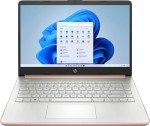
The HP 14-cf2733wm is a lightweight, budget-focused laptop designed for high portability and basic computing tasks. It is widely used by students and casual users for web browsing, streaming, and document editing.
## Technical Specifications
Feature
Details
Processor
Intel Celeron N4120 (Quad-core, up to 2.6 GHz)
Memory (RAM)
4GB DDR4-2400 MHz
Storage
64GB eMMC (Reliable flash-based storage)
Display
14″ diagonal HD (1366 x 768), Micro-edge, BrightView
Graphics
Intel UHD Graphics 600
Battery Life
Up to 11.5 hours (Supports HP Fast Charge)
Weight
~1.45 kg (3.2 lbs)
OS
Windows 11 Home in S mode
## Key Features & Description
Quad-Core Efficiency: Unlike many budget laptops that use dual-core processors, the Celeron N4120 features 4 physical cores. This makes it significantly better at handling multiple browser tabs or basic multitasking without freezing.
Ultra-Portable Design: With a thin 6.5mm micro-edge bezel and a lightweight chassis, this laptop is designed to fit easily into a backpack or tote bag for use in coffee shops or classrooms.
Connectivity Suite: Despite its slim profile, it doesn’t skimp on ports:
1 x USB Type-C (5Gbps signaling rate)
2 x USB Type-A (5Gbps signaling rate)
1 x HDMI 1.4b (for external monitors or TVs)
1 x RJ-45 (Ethernet port for stable wired internet)
1 x Headphone/microphone combo
Bonus Software: Most new units come with a 1-year subscription to Microsoft 365 Personal, giving you full access to Word, Excel, and PowerPoint, along with 1TB of cloud storage.
Video Ready: Features an HP True Vision 720p HD camera with integrated dual-array digital microphones, making it a solid choice for Zoom classes or Microsoft Teams meetings.
## Critical Performance Advice
Storage Management: With only 64GB of internal storage, you will run out of space quickly if you save movies or large files locally. It is highly recommended to use a high-speed SD card (using the built-in reader) or cloud storage like OneDrive for your files.
S Mode vs. Standard: This laptop ships in “S Mode” (only allowing Microsoft Store apps). You can switch to standard Windows 11 for free to install apps like Chrome or Zoom, but keep in mind that with 4GB of RAM, you should avoid heavy background applications to keep things running smoothly.







 iPhone 17 Series
 OPEN BOX
 Top Selling
 Budget Smartphone
 Top Rated


 Top Selling


 Windows OS
 Mac OS
 Chrome OS